Transfer Balances to Secondary/Tertiary Insurance

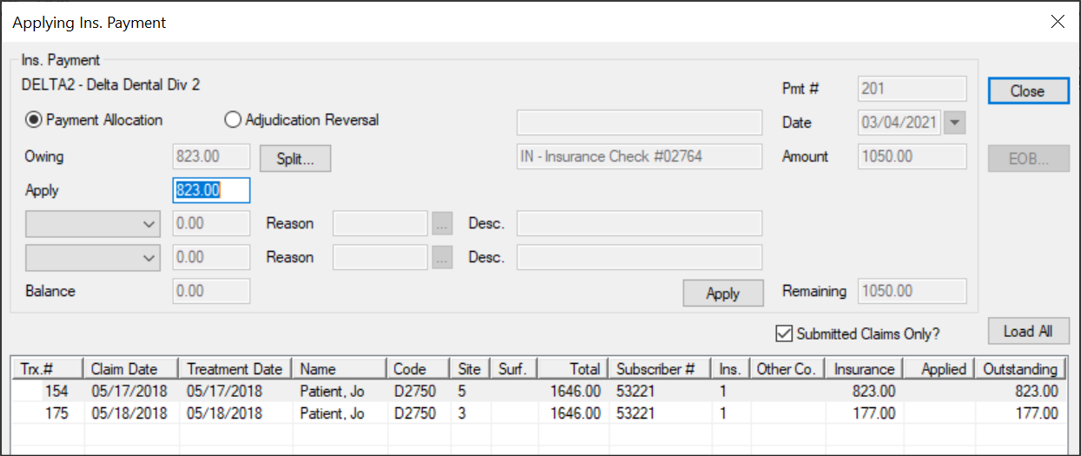
When allocating an insurance payment, you can transfer a remaining balance to the patient's secondary or tertiary insurance from the Transactions module > Insurance Payment tab.

Example: The claim is for $100 and the insurance company sends back a payment for $80. You want to transfer the remaining $20 of the charge to the patient's secondary insurance.

Tip: If necessary, you can also write off a portion of the remaining balance using the available fields.

To transfer a balance to a patient's secondary or tertiary insurance:

  1. From the Applying Ins. Payment window, modify the Apply field to the amount being paid by the insurance company.
  2. Tip: If not covered at all, enter 0.00.

  3. From the drop-down field, select Transfer and in the applicable text field, enter the dollar amount you are transferring.
  4. Click the Reason ellipsis to select a reason from the Adjustment Codes window.
  5. In the Description field, enter the EOB denial explanation associated with the Reason.
  6. From the Transfer To drop-down field, select Insurance.
  7. Confirm the Balance field displays 0.00 and click Apply.
  8. When prompted with the Bill Secondary Policy Question to create the claim for the next insurance policy to be billed, click Yes.