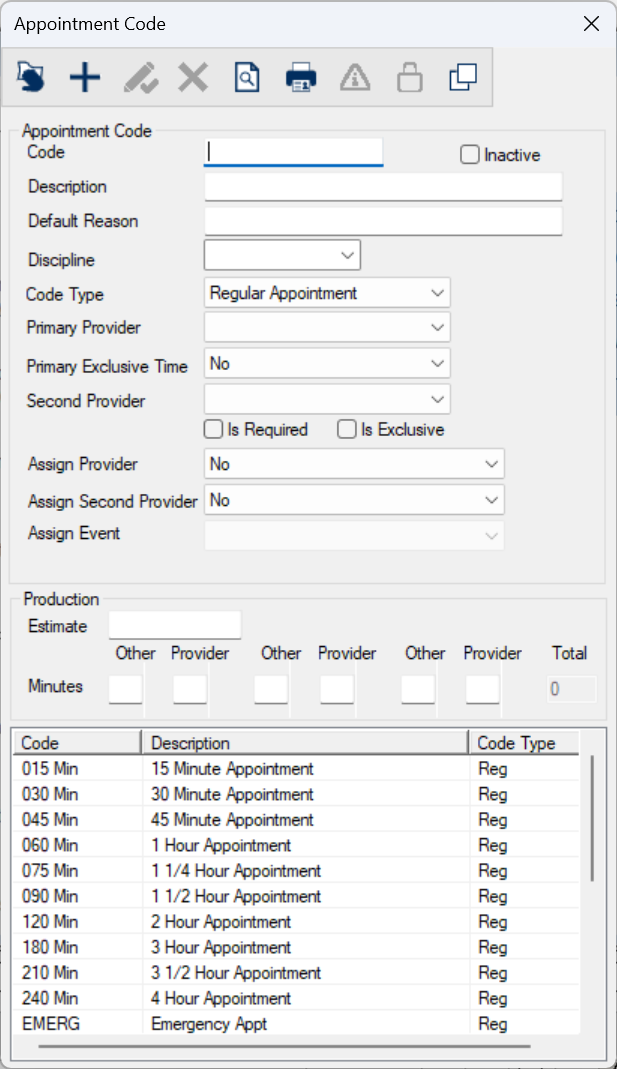
Appointment Code Window
An appointment code is required in order to create an appointment for a patient. Appointment codes designate the type and length of an appointment.
The Appointment Code window allows you to manage appointment codes.
 Appointment Code - Field Definitions Appointment Code - Field Definitions
|
Code
|
A text field that uniquely identifies the appointment code.
Examples: 030MIN and RECALL
Note: The field is limited to 6 alphanumeric values.
|
| Description
|
A text field that indicates the full name of the appointment code.
Examples: 30 Minute Appointment and Recall
|
| Default Reason |
A text field that indicates the appointment reason associated with the appointment code.
It displays by default in the Reason field when the appointment code is used to add an appointment.
|
| Discipline |
A drop-down list that indicates the discipline associated with the appointment code.
It displays by default when the appointment code is used to add an appointment.
|
| Code Type |
A drop-down list that indicates the type of appointment:
-
Regular Appointment
-
Recall Appointment
-
Hygiene Recall
Note: If selected, the Primary Provider field is set to Hygienist / CDA, the Second Provider field is set to Dentist / Student. and the Is Required checkbox is deselected.
|
| Primary Provider |
A drop-down list that indicates the type of provider who can perform this appointment.
-
<blank>: Any type of provider can use this appointment code.
-
Dentist / Student: The primary provider must be a dentist or a student.
Note: This is managed from the Provider Type Codes window. TheSubtype field must be set to Dentist or Student.
-
Hygienist / CDA: The primary provider must be a hygienist or a CDA.
Note: This is managed from the Provider Type Codes window. TheSubtype field must be set to Hygienist or CDA.
-
Other: The primary provider must be something other than the above.
Note: This is managed from the Provider Type Codes window. TheSubtype field must be set to Other.
Tip: Other provider types cannot see this appointment code in their list of appointment codes when they log in to axiUm.
|
| Primary Exclusive Time |
A drop-down list that indicates the exclusivity rule used for this appointment code, for the primary provider.
It displays by default in the Exclusive Provider Time field when the appointment code is used to add an appointment.
-
No: The provider can be double-booked for other appointments, assuming this breaks no other rules.
-
Yes (Appt. Time): The entire duration of the appointment is exclusive.
-
Yes (Prov. Time): Only the provider portion of the time is exclusive.
Note: This time refers to the minutes indicated in the Provider fields only.
|
| Second Provider |
A drop-down list that indicates who can be the second provider on this
appointment:
-
<blank>: Any type of provider can be the second provider.
-
Dentist / Student: The second provider must be a dentist or a student.
Note: This is managed from the Provider Type Codes window. TheSubtype field must be set to Dentist or Student.
-
Hygienist / CDA: The second provider must be a hygienist or a CDA.
Note: This is managed from the Provider Type Codes window. TheSubtype field must be set to Hygienist or CDA.
-
Other: The second provider must be something other than the above.
Note: This is managed from the Provider Type Codes window. TheSubtype field must be set to Other.
Tip: Other provider types cannot see this appointment code in their list of appointment codes when they log in to axiUm.
Note: When selected, the Is Required checkbox is enabled.
|
| Is Required |
A checkbox that, when selected, indicates that a secondary provider is required for this appointment code.
Note: This field is only enabled when the Second Provider field is set.
|
| Is Exclusive |
A checkbox that, when selected, indicates the second provider assigned to this
appointment code requires exclusive time. |
| Assign Provider |
A drop-down list that indicates whether to assign a primary provider when scheduling this
appointment code:
-
No: Do not assign a provider.
-
Prompt (except Free Access Patients): Prompt the user at the time appointment is added.
-
Always (if no Primary Provider): axiUm will assign a provider to the patient only if the patient does not already have an assigned primary provider.
-
Always: axiUm will assign an appointment provider to the patient, even if this patient already has an assigned provider.
Note: This field works in conjunction with the Free Access checkbox in the Patients module > Patient Info window > Codes tab > Additional section.
|
| Assign Second Provider |
A drop-down list that indicates whether to assign a secondary provider when scheduling this
appointment code:
-
No: Do not assign a provider.
Note: If selected, the Assign Event field must be blank.
-
Prompt (except Free Access Patients): Prompt the user at the time appointment is added.
-
Always (if no Primary Provider): axiUm will assign a provider to the patient only if the patient does not already have an assigned primary provider.
-
Always: axiUm will assign an appointment provider to the patient, even if this patient already has an assigned provider.
Note: This field works in conjunction with the Free Access checkbox in the Patients module > Patient Info window > Codes tab > Additional section.
|
| Assign Event |
A drop-down list that indicates when the patient assignment occurs:
-
<Blank: axiUm assigns the provider to the patient when the appointment is booked
Patient Check-In: Auto-assign the provider to the patient when this patient checks in to the clinic.
-
Scheduling Appt: Auto-assign provider to patient when the provider is restricted to assigned patients and the patient is not free access and the patient does not already have a provider.
Note: This field works in conjunction with the Assign Provider.
|
| Estimate |
A text field that indicates the estimated cost of an appointment that uses this appointment
code.
It displays in the Estimate field when the appointment code is used to add an appointment.
|
| Minutes |
This indicates the time allotment for each provider and other provider who are
performing a treatment using this appointment code. Up to three sets of other time and provider time can be defined for
appointments with multiple providers.
Example: The other time is for the second provider on the appointment and can be
before and/or after the primary provider's time. If the Minutes fields display 10-30-10, this
would indicate that the second provider starts the appointment for 10 minutes, then the
primary provider will be in the chair for 30 minutes, and then the second provider will
finish the appointment for 10 minutes.
The values entered here are displayed in the Provider fields, Other fields, and Total field when the appointment code is used to add an appointment.
Note: This field works in conjunction with the Scheduler Options window > Appt Entry Window
section > Advanced radio button.
|
Provider Appointment Codes Window
(Maintenance > Scheduler > Appointment Code)
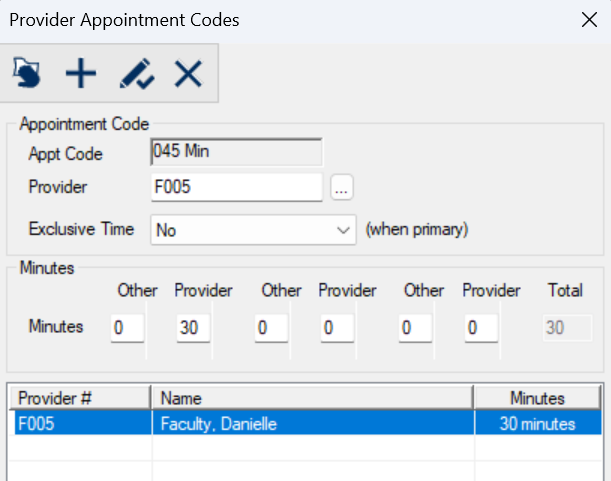
The Provider Appointment Codes window allows you to define different time lengths for specific providers for this appointment code.
Example: Doctors may perform the same procedure in less time than a student, or a specialist may perform certain procedures more efficiently.
When you schedule an appointment using this appointment code and provider, axiUm uses these custom settings to override the settings indicated in the Appointment Code window.
The window displays when you open the Appointment Code window, select an appointment code, and click the Provider Appointment Code ( ) icon. ) icon.
Provider Appointment Codes - Field Definitions
| Appt Code
|
A read-only field that identifies the selected appointment code.
|
| Provider
|
A text field that indicates the provider.
The ellipsis is used to display the Providers List window and select a provider.
|
|
Exclusive Time ___ (when primary)
|
A drop-down list that indicates the exclusivity rule used for this appointment code for the
primary provider.
It displays by default in the Exclusive Provider Time field when the appointment code is used to add an appointment.
-
No: The provider can be double-booked for other appointments, assuming this breaks no other rules.
-
Yes (Appt. Time): The entire duration of the appointment is exclusive.
-
Yes (Prov. Time): Only the provider portion of the time is exclusive.
Note: This time refers to the minutes indicated in the Provider fields only.
|
| Minutes |
This indicates the time allotment for the provider and second provider who are
performing a treatment using this appointment code. Up to three sets of other time and provider time can be defined for
appointments with multiple providers.
Example: The other time is for the second provider on the appointment and can be
before and/or after the primary provider's time. If the Minutes fields display 10-30-10, this
would indicate that the second provider starts the appointment for 10 minutes, then the
primary provider will be in the chair for 30 minutes, and then the second provider will
finish the appointment for 10 minutes.
The values entered here are displayed in the Provider fields, Other fields, and Total field when the appointment code is used to add an appointment.
Note: This field works in conjunction with the Scheduler Options window > Appt Entry Window
section > Advanced radio button.
|
Provider Appointment Codes - Tasks
| Add Provider Appointment Codes
|
- Click the Clear Data (
 ) icon. ) icon.
- Complete the fields as necessary and click the Add a new Record (
 ) icon. ) icon.
|
| Edit Provider Appointment Codes
|
- Select a listed entry.
- Make any necessary changes and click the Modify Record (
 ) icon. ) icon.
|
| Delete Provider Appointment Codes
|
- Select a listed entry and click the Delete Record (
 ) icon. ) icon.
- When prompted, click Yes to confirm the deletion.
|
Appointment Code Access Window
(Maintenance > Scheduler > Appointment Code)
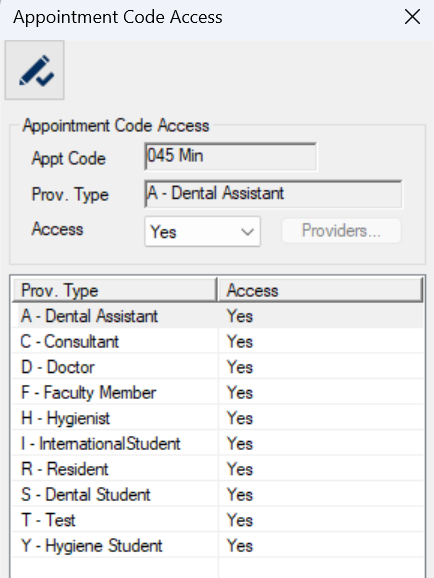
The Appointment Code Access window allows you to give providers access to the selected appointment code.
It displays when you open the Appointment Code window, select an appointment code, and click the Appointment Code Access ( ) icon. ) icon.
Appointment Code Access - Field Definitions
| Appt Code/ Prov. Type |
Read-only fields that identify the selected appointment code and provider type(s).
|
| Access
|
A drop-down list that indicates access to the appointment code for the selected provider type(s):
- No: The provider type has no access to the appointment code.
- Yes: The provider type has full access to the appointment code.
- Limited: The provider type access is limited to selected providers.
Note: If selected, the Providers... button is enabled.
|
|
Providers...
|
A button that displays the Provider Access to Appointment Code window and allows you to select specific providers and also to change the default minutes for those providers.
Note: This button is only enabled if the Access field is set to Limited.
|
Appointment Code Access - Tasks
| Configure Appointment Code Access
|
-
Select one or more provider levels that should have the same access.
-
Complete the fields as necessary and click the Modify Record () icon.
-
Repeat the steps for all necessary provider levels.
|
Provider Access to Appointment Code Window
(Maintenance > Scheduler > Appointment Code > Appointment Code Access)
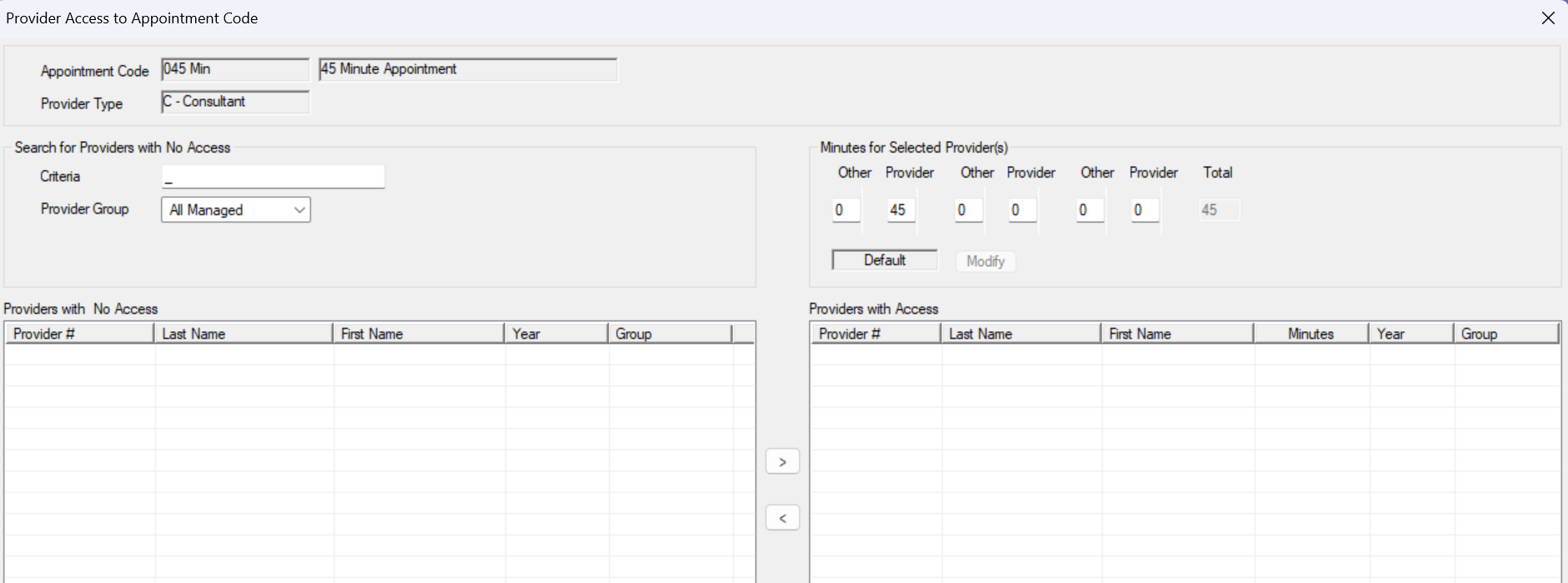
The Provider Access to Appointment Code window allows you to give specific providers access to the selected appointment code and also to change the default minutes for those providers.
It displays when you open the Appointment Code Access window, select a provider type, set the Access field to Limited, and click the Providers... button.
Note: The Providers... button is only enabled if the Access field is set to Limited.
Provider Access to Appointment Code - Field Definitions
| Appointment Code/ Provider Type |
Read-only fields that identify the selected appointment code and provider type(s).
|
| Criteria
|
A text field that is used to enter your search criteria.
|
|
Provider Group
|
A drop-down list that indicates the provider group to limit access.
|
| Minutes |
This indicates the time allotment for the provider and second provider who are
performing a treatment using this appointment code. Up to three sets of other time and provider time can be defined for
appointments with multiple providers.
Example: The other time is for the second provider on the appointment and can be
before and/or after the primary provider's time. If the Minutes fields display 10-30-10, this
would indicate that the second provider starts the appointment for 10 minutes, then the
primary provider will be in the chair for 30 minutes, and then the second provider will
finish the appointment for 10 minutes.
The values entered here are displayed in the Provider fields, Other fields, and Total field when the appointment code is used to add an appointment.
Note: This field works in conjunction with the Scheduler Options window > Appt Entry Window
section > Advanced radio button.
|
| Default |
This read-only field indicates that the if the default values in the Other and Provider fields
have not been changed. |
| Modify |
A button that allows you to save the changes made to the Other and Provider fields.
Note: This button is only enabled if the Other and Provider fields have been changed.
|
Provider Access to Appointment Code - Tasks
| Search for Providers
|
- Use the Criteria field and the Provider Group and drop-down list to set the search parameters.
- Click a column header to search.
- Review the results.
|
| Add Providers with Access
|
- Under Providers with No Access, select a listed provider and click the (
 ) button to move to the Providers with Access list box. ) button to move to the Providers with Access list box.
- (Optional) Complete the Minutes fields as necessary and click Modify.
- Repeat Steps 1-2 as necessary for each provider you want to add.
|
| Edit Providers with Access
|
- Select a listed provider in the Providers with Access list box.
- Make any necessary changes to the Minutes fields and click Modify.
- Repeat Steps 1-2 as necessary for each provider you want to edit.
|
| Remove Providers with Access
|
- Under Providers with Access, select a listed provider and click the (
 ) button to move to the Providers with No Access list box. ) button to move to the Providers with No Access list box.
- Repeat as necessary for each provider you want to remove.
|
Copy Provider Appointment Code Setup Window
(Maintenance > Scheduler > Appointment Code)
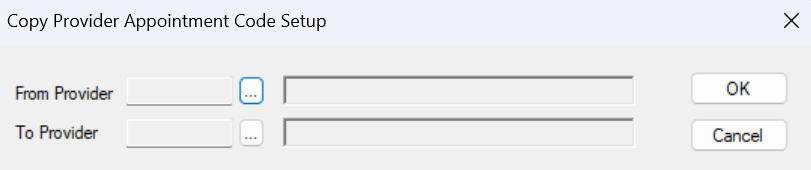
The Copy Provider Appointment Code Setup window allows you to copy the appointment code setup from one provider to another provider quickly. It displays when you open the Appointment Code window, select an appointment code, and click the Copy Provider Appointment Code Setup ( ) icon. ) icon.
Copy Provider Appointment Code Setup - Field Definitions
| From Provider
|
A text field that indicates the provider you are copying the appointment code from.
The ellipsis is used to display the Providers List window and select a provider.
|
| To Provider
|
A text field that indicates the provider you are copying the appointment code to.
The ellipsis is used to display the Providers List window and select a provider.
|
|
 ) icon or the Print Report (
 ) icon to display the Preview/Print Appointment List Code window.