|
Providers should submit a dispensary request for a kit when they need equipment for treatment.
There are two request types:
- Automatic requests: These are sent when an appointment is scheduled and the treatment is specified.
- Manual requests: These are sent when you add individual items to an appointment or when a treatment and the required equipment changes.
You can submit manual dispensary requests from the Patients module and the Personal Planner module > Dispensary sub-tab.
Note: After you submit a dispensary request, you can manage it from the Personal Planner module.
To submit a dispensary request:
- Open one of the following modules to display the Dispensary Request window:
 Access from the Patients module Access from the Patients module
-
Open the Patients module.
- Locate the correct patient in the selection list or search results.
-
Right-click the patient name and select Dispensary Request.
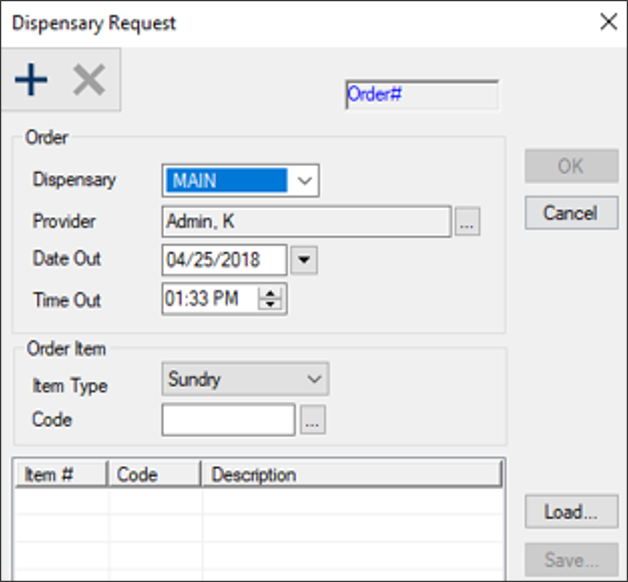
- Complete the fields as necessary and click the Create a new Record (
 ) icon. ) icon.
Tip: Request templates allow you to submit dispensary requests more quickly. If defined, click Load to open and select an existing template.
|
Field
|
Description
|
|
Dispensary
|
Select a clean dispensary location from the drop‑down list.
|
|
Provider
|
This field defaults to the logged‑in user but represents the provider this request is for.
If making the request for another provider, click the ellipsis to change the provider.
|
|
Date Out / Time Out
|
Select the date and time the provider requires the kit(s).
|
|
Item Type
|
Select one of the following from the drop‑down list:
- Sundry: A one‑time use disposable product.
Note: If selected, the Code ellipsis displays disposable product codes.
- Kit: A reusable item or group of items.
Note: If selected, the Code ellipsis displays disposable product codes.
|
|
Code
|
Click the ellipsis to select a sundry or kit type code.
|
- Repeat Step 2 for each kit/sundry you are adding to the request.
-
(Optional) Remove dispensary item(s).
-
Select a listed item and click the Delete ( ) icon. ) icon.
-
When prompted, click Yes to confirm the deletion.
-
(Optional) Click Save… to save the list of items as a dispensary request template.
-
Click OK to submit your request.
-
When prompted to print the kit request receipt, click Yes or No as necessary.
|