Manage Anesthetics
|
The anesthetics used in surgery display in the Anesthetics/Vitals tab once you have selected a case and appointment. Tip: If the tab does not display, right-click the appointment and select Enable Anesthetics/Vitals tab. You can click the Toggle Text/Graphic View ( Note: If vitals and anesthetics are set to the same view (both text or both graphic), they are time-synched.  Text View Text View
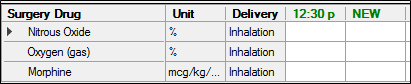
This view displays the list of surgery drugs, the units (measuring systems, percentages, weights, or volumes), the methods of drug delivery to the patient, the total units of anesthesia administered from start to present, and the units of anesthesia considered unused or wasted (if applicable). Note: Drug types that require entered waste display with a pink background. It also displays the values for those drugs as numbers and percentages in horizontal rows, measuring time incrementally from left to right. Values in black text indicate that the entries are in a normal range, values in orange text indicate that the dosage value or total dosage is approaching a maximum, and values in red text indicate that the maximum dosage value or total dosage has been reached.
Graphic View
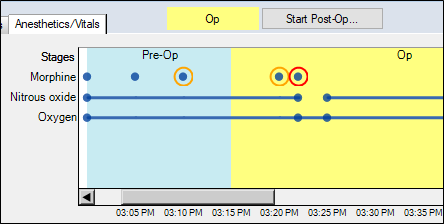
This view displays the surgery drugs list and plots the values for those drugs, as entered, from left to right. It also displays each surgery stage with a different colored background.
A blue dot (●) indicates that a drug entry value has been entered and is in a normal range, while an orange circle (Ο) indicates that the dosage entry value or total dosage is nearing the maximum level, and a red circle (Ο) indicates that the maximum dosage value or total dosage has been reached. A line between dots indicates continuous values (usually displays for gases inhaled or liquids with continuous flow). To manage anesthetics:
Specify Anesthetics for Surgery
Depending on your institution's setup, common anesthetics may be added by default to your surgery drugs list. When necessary, you can adjust the surgery drugs before or during surgery.
Add Drugs to Surgery
Edit Surgery Drugs
Delete Surgery Drugs
The updated drug list displays in the Anesthetics/Vitals tab.
Enter Anesthetic Values
As drugs are administered to the patient, data is entered manually into axiUm. Columns (representing times) are added throughout the surgery at specified intervals (usually 5 minutes). Data can be entered into these columns, or if a drug is administered outside of one of these times, a manual entry (and column) can be added. Certain surgery drugs follow specific entry guidelines: To enter anesthetic values: Note: If the time is not displayed in a column, click NEW to display the column and specify the time of the entry, then press Enter to create the column. Tip: Use keyboard shortcuts. You can press Ctrl + N to open a new column or press Ctrl + T to edit an entered time.
Note: If the drug is a percentage mixture of another drug, entering the value for one of the drugs auto-calculates the other drug's value. Clear Columns
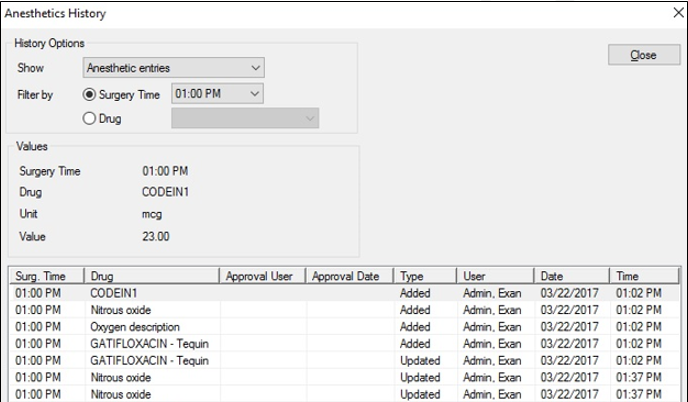
In some cases, it is necessary to clear column data from the Anesthetics/Vitals tab. Note: Removed column data still displays in the Anesthetic History window. To clear a column: The anesthetics column clears. Delete Columns
In some cases, it is necessary to remove a column from the Anesthetics/Vitals tab. Note: Removed column data still displays in the Anesthetic History window. To a delete column: The entire column is removed from the tab. Important: This clears the associated vitals column as well. Enter Anesthetic Waste
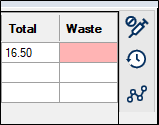
Waste is the quantity of an anesthetic drug remaining at the surgery’s end or wasted during the surgery. The quantity appears in the Waste column on the right side of the anesthetics pane. Note: If required, the column cell displays in pink until a value has been entered.
To enter the anesthetic waste: The cell color turns white. Note: The entry auto-saves when you click away from the cell. Tip: If you remove the waste entry, the background color reverts to pink. Approve Anesthetic Waste
When data is entered for a drug that requires waste approval, axiUm displays a teal Approve Waste indicator and an Approve button beside the indicator becomes active.
Waste approvals must be completed: Note: Once the waste is approved, users who require approval can no longer enter waste values. Users who can approve waste can modify waste values after approval to make corrections. To approve waste: The waste is approved, and the indicator beside the Approve button changes to one of the following: View Anesthetic History
axiUm records all anesthetic data entered during a surgery with full audit information. This includes any deleted anesthetic and vitals columns. You can view the history of any drug used in the surgery, including the time it was added or updated, along with the associated unit and value. To view anesthetic history:
|
 ) and (
  ) icons to view anesthetics in text or graphic mode.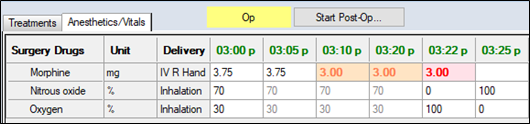
 ) icon to display the Surgery Drugs window.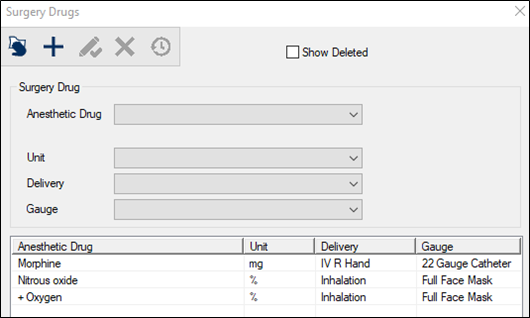
 ) icon.
 ) icon.
 ) icon.
 ) icon.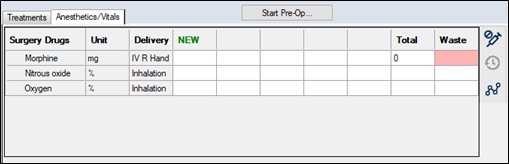

 ) icon to display the Anesthetics History window.