Linked Apps
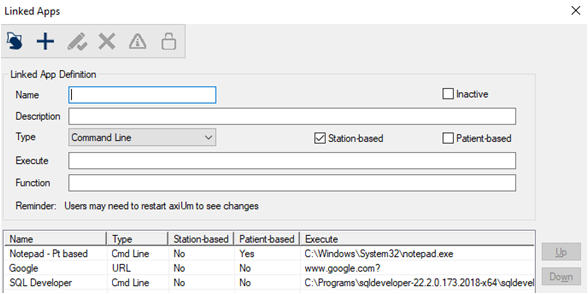
Linked Apps Window[Accessed from Maintenance > System > Linked Apps] The Linked Apps module is an axiUm+ module that allows your institution to integrate software with axiUm quickly and easily. Each linked app will have unique requirements regarding the specific parameters that should be passed to the application, as well as the formatting and order of these parameters. The Linked Apps module uses custom functions that allows axiUm to generate this string of parameters and pass it to the application when launched. You can also configure Linked Apps to authenticate users in third-party integrations via Single Sign-On (SSO). This functionality allows you to use secure token-based authentication to pass user credentials and be fully authenticated in the linked app once it launches from axiUm. Important: CAPI version 2.13.0+ is required to use SSO authentication. The Linked Apps window allows you to manage Linked App integrations. Important: Each linked app requires an Oracle function to be created in your database. For more information on working with functions, please contact axiUm Support.
 Linked Apps - Field Definitions Linked Apps - Field Definitions
Linked Apps - Tasks
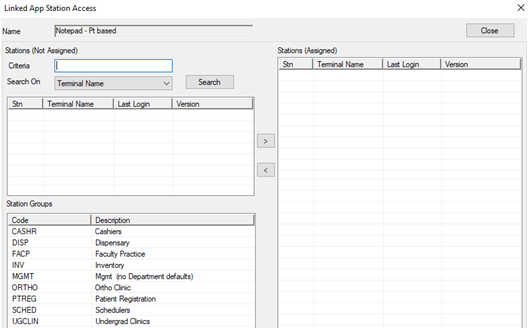
Linked App Station Access Window[Accessed from Maintenance > System > Linked Apps > Station Access ( The Linked App Station Access window allows you to specify workstations that can launch the selected linked app. It displays when you open the Linked Apps window, select a listed link and click the Station Access ( Tip: This window is only available when the Restrict app access to certain workstations checkbox is selected for the linked app.
Linked App Station Access - Field Definitions
Linked App Station Access - Tasks
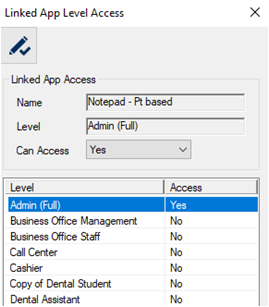
Linked App Level Access Window[Accessed from Maintenance > System > Linked Apps > Level Access ( The Linked App Level Access window allows you to manage access to the selected link. It displays when you open the Linked Apps window, select a listed link and click the Level Access (
Linked App Level Access - Field Definitions
Linked App Level Access - Tasks
|
 button that displays the Expanded Text (Additional Information) window and allows you to modify the json defaults as necessary to enter your values.
 ) icon is enabled, and you must specify workstations that can be used with this linked app.
 ) icon.
 ) icon.
 ) icon to display the
  ) icon.
 ) icon.