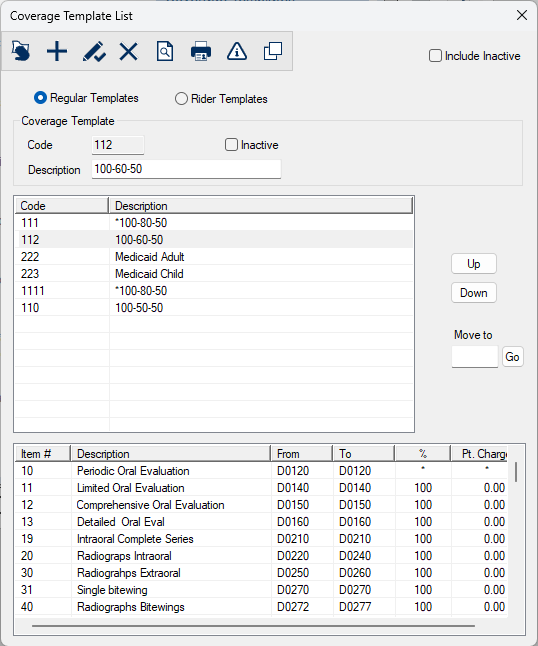
Coverage Template List Window
[Accessed from Maintenance > Insurance > Coverage Templates]
A coverage template defines the policy coverage for dental treatment. Each coverage template is a list of treatments that an insurance policy will or will not pay for. It is made up of ranges of procedure codes that are covered at certain percentages.
Coverage templates are used in the Patient Card when entering insurance information.
The Coverage Template List window allows you to create and manage a list of templates for use at your institution. These templates are used to calculate the insurance and patient responsibilities for dental procedures.
Note: A coverage template can be copied into or linked to a patient's benefit plan. For copied templates, you can make changes to the coverage without modifying the original template. For linked templates, when a change is made to the original template, it is reflected immediately in the policy records of patients with the same template.
Important: Changes to linked templates must be made from Maintenance > Insurance > Coverage Templates.
 Coverage Template List - Field Definitions Coverage Template List - Field Definitions
|
Regular Templates / Rider Templates
|
A set of radio buttons that identifies the type of coverage template:
-
Regular Templates: These are base plans that typically include core insurance coverage. They are designed to cover standard, everyday dental needs. If selected, only regular templates display in the list.
-
Rider Templates: These are typically an endorsement or amendment to a base plan that extends coverage beyond the standard terms, acting as an add-on or extra. If selected, only rider templates display in the list.
Example: Some insurance companies may offer a rider for orthodontic coverage. This can keep premiums lower for more basic coverage while allowing subscribers to purchase add on coverage.
|
| Code
|
A text field that indicates the unique numeric ID code that identifies the template.
When adding a template, this code must not already be in use.
Tip: Click the Code column header to sort the codes numerically and choose an available code.
|
| Description
|
A text field that describes the coverage in the template.
This will help users understand the purpose for the template and find the appropriate template to copy from when building a new and similar template.
Examples:
-
100/80/50
-
Medicaid Child
-
Medical Adult
|
Edit Coverage Template Window
[Accessed from Maintenance > Insurance > Coverage Template List > Coverage Items ( ) icon] ) icon]
The Edit Coverage Template window allows you to review and update information about a regular or rider coverage template. It displays when you open the Coverage Template List window, select a listed template, and click the Coverage Items () icon.
Edit Coverage Template - Field Definitions
| Coverage / Description |
Read-only fields that identify the selected coverage template.
|
| Item #
|
A text field that indicates the item line number of the procedure range. It is used to sort the list.
Tip: Use increments of 10 when adding items to allow for insertion of new lines at a later date. This can be useful when a major change needs to be made.
Example: Adding new procedure codes when required by dental associations each year.
|
|
Name
|
A text field that indicates the name of the procedure range.
Examples: Radiographs, Implants, Amalgam Fillings
|
| Category
|
A text field that indicates the user defined category of the procedure range.
Examples: Basic, Prev, Major, and Ortho.
|
| From / To |
Text fields that indicate that the first and last ADA procedure codes for this range of procedure codes.
The ellipses are used to display the Procedure Codes List window and select a procedure code.
|
| Age-specific Coverage
|
A checkbox that, when selected, indicates that coverage for the procedure range applies to a specific age range.
Note: If selected, the Age-specific Coverage Details () icon is enabled.
Examples: Sealants, Fluoride
|
| Percentage
|
A text field that indicates the coverage percentage for the procedure range.
Note: Do not use the % sign here. Enter the percentage as a whole number.
|
| Times#
|
A text field that indicates the number of times this procedure in the range will be covered per frequency period.
For treatments that are site and surface based, this field indicates the number of times each procedure in the range will be covered for each particular site and surface.
Note: This field is used if the procedure has a frequency limit.
|
| Frequency
|
A text field that indicates the frequency that the procedure range will be covered.
A drop-down list that indicates the frequency period that the procedure range will be covered:
-
N/A
-
Month(s)
-
Year(s)
-
Policy Year(s)
-
Life time
Example: 1 per lifetime.
Note: These fields are used if the procedure has a frequency limit. A period set as 1 per year will allow the procedure to be performed once in a 365 day
period, whereas a period set as 1 per policy year will allow the procedure to be
performed once per policy year. I.e., the policy year end is on 6/30 so they could have an
exam posted on 6/20 that is covered and another exam on 7/20 that will also be covered.
Important: The policy year end is defined on the insurance benefit plan.
|
|
Patient Charge
|
A text field that indicates the dollar ($) amount that will be charged to the patient whenever a procedure within the range is entered.
This is the per procedure co-pay amount.
Note: Templates with patient charges are rare and when used the corresponding percentage is usually 100. The patient charge amount will be owed by the patient and any remainder would be covered by the insurance company. The insurance company will usually provide their own fee guide and a list of the corresponding patient charges.
|
| Only covered for certain sites
|
A checkbox that, when selected, indicates that the procedure is only covered for specific sites and displays a Sites... button.
Example: Sealants are usually only covered on molars.
|
| Sites...
|
A button that displays the Select Tooth Sites window and allows you to manage the tooth sites applicable to the selected procedure range. |
| Has Category Limit/Deduct
|
A checkbox that, when selected, indicates that this coverage range has a category limit and/or
deductible.
Example: Ortho categories often have a lifetime limit for any covered procedures within the category.
|
| Cat Deduct
|
A text field that indicates the dollar ($) amount of the category’s deductible.
Notes:
|
| Cat Limit _ is a _
|
A checkbox that, when selected, indicates that there is a category limit.
A text field that indicates the dollar ($) amount of the limit.
A drop-down list the indicates the type of limit:
-
Insurance Limit: This is the maximum an insurance company will pay.
-
Patient Maximum: This is the maximum a patient would pay out of pocket.
-
Patient Maximum (plus Deductible)
Note: These fields are only enabled if the Has Category Limit/Deduct checkbox is selected.
|
| Cat Period
|
A text field and drop-down list that indicate the time period for which the category deductible and/or limit applies:
-
N/A
-
Month(s)
-
Year(s)
-
Life time
Note: These fields are only enabled if the Has Category Limit/Deduct checkbox is selected.
|
| Affects Patient/Family Limit/Deduct
|
A checkbox that, when selected, indicates that the patient or family deductible and limit
balance as well as the category deductible and limit balance are affected when a procedure in this
category is performed.
Note: This field is only enabled if the Has Category Limit/Deduct checkbox is selected.
|
| Has Item Limit/Deduct
|
A checkbox that, when selected, indicates that the coverage range has an item limit and/or
deductible.
Note: Item is more granular that a category and refers to a single line item in the list.
|
| Item Deduct
|
A text field that indicates the dollar ($) amount of the item’s deductible.
Note: This field is only enabled if the Has Item Limit/Deduct checkbox is selected.
|
| Item Limit
|
A checkbox that, when selected, indicates that there is an item limit.
A text field that indicates the dollar ($) amount of the limit.
Note: This field is only enabled if the Has Item Limit/Deduct checkbox is selected.
|
| Item Period
|
A text field and drop-down list that indicate the time period for which the item deductible and limit applies:
-
N/A
-
Month(s)
-
Year(s)
-
Life time
Note: This field is only enabled if the Has Item Limit/Deduct checkbox is selected.
|
| Affects Patient/Family Limit/Deduct
|
A checkbox that, when selected, indicates that the patient or family deductible and limit
balance as well as the item deductible and limit balance are affected when a procedure in this
category is performed.
Note: This field is only enabled if the Has Item Limit/Deduct checkbox is selected.
|
Copy Coverage Template Window
[Accessed from Maintenance > Insurance > Coverage Template List > Copy Coverage Template ( ) icon] ) icon]
The Copy Coverage Template window allows you to make a copy of the currently selected coverage template.
The new template will be created with the Code, Order, and Description that you enter here. Once the copy has been made, you can make changes to the coverage without modifying the original template or affecting other patients with the same plan.
The Copy Coverage Template window displays when you open the Coverage Template List window, select a listed template, and click the Copy Coverage Template () icon.
Copy Coverage Template - Field Definitions
| Copy From
|
A read-only field that identifies the selected coverage template.
|
| Code
|
A text field that uniquely identifies the new coverage template. |
| Description
|
A text field that identifies the new coverage template.
|
Template Age-specific Coverage Window
[Accessed from Maintenance > Insurance > Coverage Template List > Edit Coverage Template > Age-specific Coverage Details () icon]
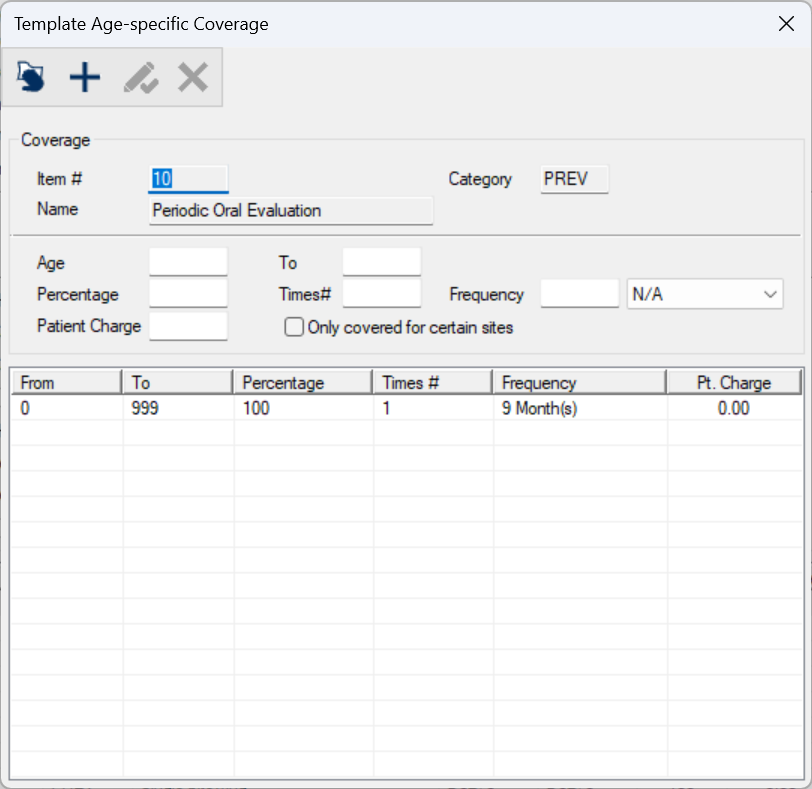
The Template Age-specific Coverage window allows you to manage sub-templates for age-related procedure limitations in a coverage template.
It displays when you open the Edit Coverage Template window, select a listed procedure, and click the Age-specific Coverage Details () icon.
Template Age-specific Coverage - Field Definitions
| Item # / Name / Category |
Read-only fields that indicate the selected coverage item.
|
| Age / To |
Text fields that indicate the ages to and from that the procedure range is covered.
Note: The age limit cannot extend past the benefit plan's age limits. . Age limits are up to an including the specified age. If a patient is covered from age 0 to age 17, they will no longer be covered when they are 18.
Example: A benefit plan covers children up to age 18. A rider can be set up to provide additional coverage up until a younger age (e.g. 17), but cannot extend coverage past age 18. For a child rider coverage to be in effect, you must indicate the age limit. If you enter 0, the child rider coverage will not be in effect. If there is an adult rider coverage specified, axiUm will use that instead. If an adult rider coverage does not exist, axiUm uses the main policy coverage.
|
| Percentage
|
A text field that indicates the coverage percentage for the procedure range.
Note: Do not use the % sign here. Enter the percentage as a whole number.
|
| Times#
|
A text field that indicates the number of times this procedure range will be covered.
Note: This field is used if the procedure has a frequency limit.
|
| Frequency
|
A text field that indicates the frequency that the procedure range will be covered.
A drop-down list that indicates the frequency period that the procedure will be covered:
-
N/A
-
Month(s)
-
Year(s)
-
Policy Year(s)
-
Life time
Example: 1 per lifetime.
Note: These fields are used if the procedure has a frequency limit. A period set as 1 per year will allow the procedure to be performed once in a 365 day
period, whereas a period set as 1 per policy year will allow the procedure to be
performed once per policy year. I.e., the policy year end is on 6/30 so they could have an
exam posted on 6/20 that is covered and another exam on 7/20 that will also be covered.
|
|
Patient Charge
|
A text field that indicates the dollar ($) amount that will be charged to the patient whenever a procedure within the range is entered.
This is the per procedure co-pay amount.
Note: Templates with patient charges are rare and when used the corresponding percentage is usually 100. The patient charge amount will be owed by the patient and any remainder would be covered by the insurance company. The insurance company will usually provide their own fee guide and a list of the corresponding patient charges.
|
| Only covered for certain sites
|
A checkbox that, when selected, indicates that the procedure is only covered for specific sites and displays a Sites... button.
Example: Sealants are usually only covered on molars.
|
| Sites...
|
A button that displays the Select Tooth Sites window and allows you to manage the tooth sites applicable to the selected procedure range. |
Template Age-specific Coverage - Tasks
| Add Procedures
|
- Click the Clear Data (
 ) icon. ) icon.
- Complete the fields as necessary and click the Add a new Record (
 ) icon. ) icon.
|
| Edit Procedures
|
- Select a listed entry.
- Make any necessary changes and click the Modify Record (
 ) icon. ) icon.
|
| Delete Procedures
|
- Select a listed entry and click the Delete Record (
 ) icon. ) icon.
- When prompted, click Yes to confirm the deletion.
|
Deductible Exemptions for Coverage Template Window
[Accessed from Maintenance > Insurance > Coverage Template List > Edit Coverage Template > Deductible Exemptions ( ) icon] ) icon]
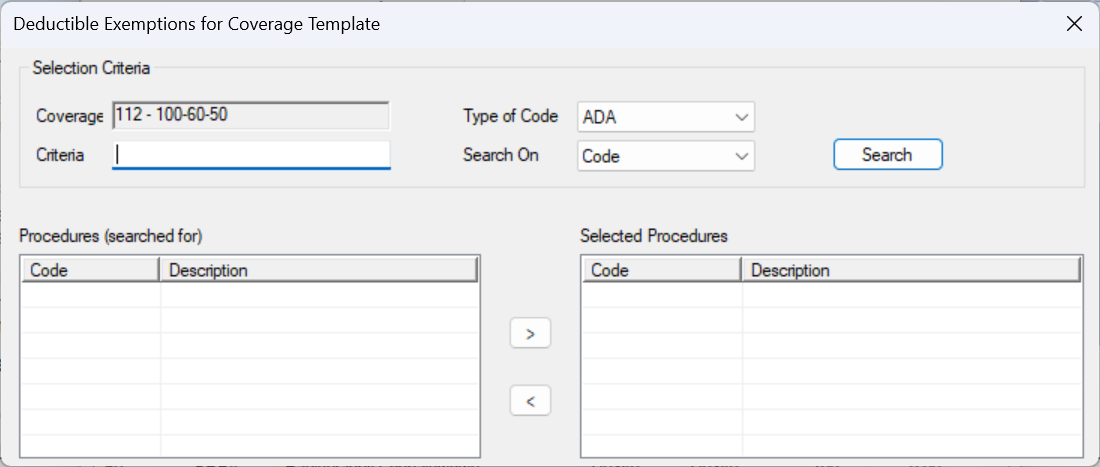
The Deductible Exemptions for Coverage Template window allows you to manage which procedures on the coverage template are exempt from deductibles.
Example: Some plans may provide deductible exemptions for preventive and diagnostic procedures for children only. This lets you specify exemptions on a child template with no affect on the adult template using the same benefit plan.
It displays when you open the Edit Coverage Template window and click the Deductible Exemptions () icon.
Deductible Exemptions for Coverage Template - Field Definitions
| Coverage
|
A read-only field that indicates the selected coverage template.
|
| Criteria
|
A text field that is used to enter your search criteria.
Tip: You can enter the first few characters of the word, or enter an underscore (_) to return all results.
|
| Type of Code
|
A drop-down list that indicates which type of code to search on:
- ADA: American Dental Association codes.
- CPT: Current Procedural Terminology (medical) codes.
|
| Search On
|
A drop-down list that indicates the field to search on:
|
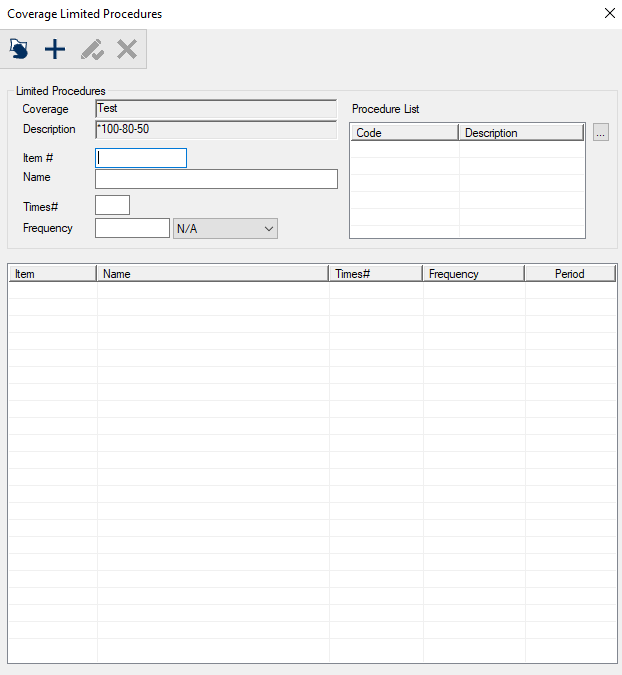
Coverage Limited Procedures Window
[Accessed from Maintenance > Insurance > Coverage Template List > Edit Coverage Template > Coverage Limited Procedures ( ) icon] ) icon]
The Coverage Limited Procedures window allows you to manage procedures that have specific coverage limits.
It displays when you open the Edit Coverage Template window and click the Coverage Limited Procedures () icon.
Coverage Limited Procedures - Field Definitions
| Coverage / Description |
Read-only fields that identify the selected coverage template.
|
| Item # |
A text field that indicates the numeric item line number of the procedure range. It is used to sort the list.
Tip: Use increments of 10 when adding items to allow for insertion of new lines at a later date. This can be useful when a major change needs to be made.
Example: Adding new procedure codes when required by dental associations each year.
|
| Name |
A text field that indicates the name for the individual line or category of the procedure range.
Examples: Radiographs, Implants, Amalgam Fillings
|
| Times# |
A text field that indicates the number of times this procedure will be covered per frequency period.
For treatments that are site and surface based, this field indicates the number of times each procedure in the range will be covered for each particular site and surface.
Note: This field is used
if the procedure range has a frequency limit.
|
| Frequency |
A text field that indicates the frequency that the procedure range will be covered.
A drop-down list that indicates the frequency period that the procedure range will be covered:
-
N/A
-
Month(s)
-
Year(s)
-
Policy Year(s)
-
Life time
Example: 1 per lifetime.
Note: These fields are used if the procedure range has a frequency limit.
A
period set as 1 per year will allow the procedure to be performed once in a 365 day
period, whereas a period set as 1 per policy year will allow the procedure to be
performed once per policy year. I.e., the policy year end is on 6/30 so they could have an
exam posted on 6/20 that is covered and another exam on 7/20 that will also be covered.
Important: The policy year end is defined on the insurance benefit plan.
|
| Procedure List |
The ellipsis is used to display the Selecting Procedures (for Coverage Limited Procedures) window and select one or several procedures. |
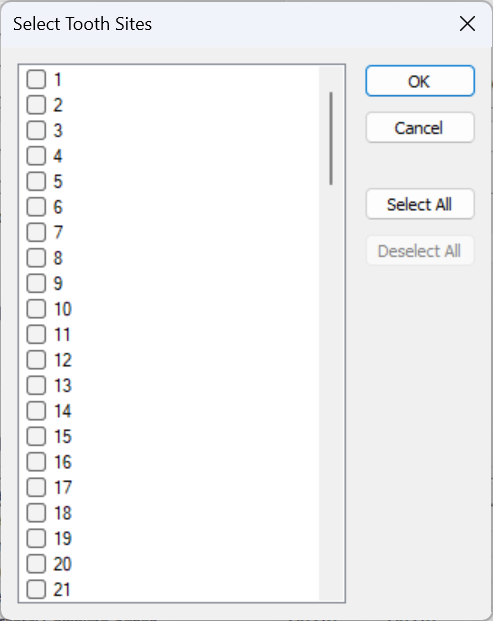
Select Tooth Sites Window
[Accessed from Maintenance > Insurance > Coverage Template List > Edit Coverage Template > Sites.... button]
The Select Tooth Sites window allows you to select the tooth sites applicable to the selected benefit plan coverage.
It displays when you open the Edit Coverage Template window and click the Sites.... button.
Select Tooth Sites - Tasks
| Specify Tooth Sites
|
- Select and deselect checkboxes as necessary.
Tip: Click Select All to select all the tooth sites. Click Deselect All to deselect all the currently selected tooth sites.
- Click OK.
|
|
 ) icon.
  ) icon.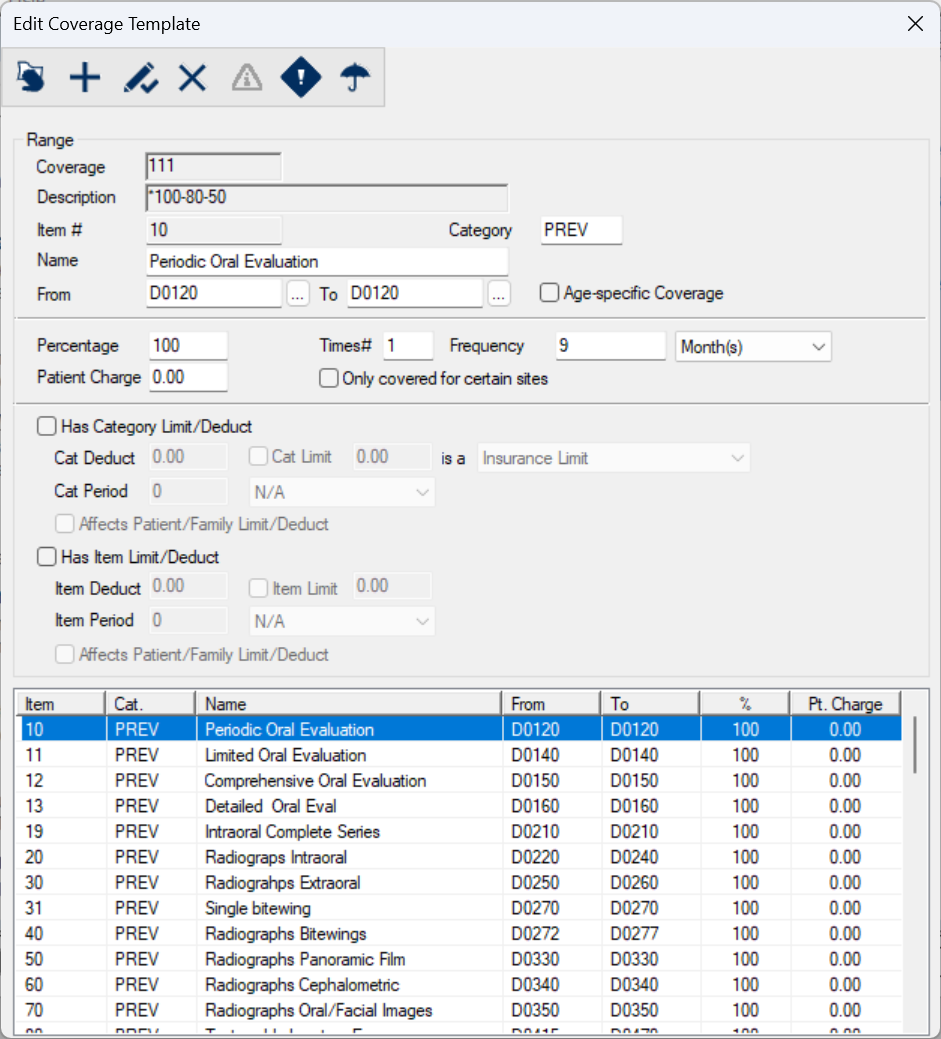
 ) icon to display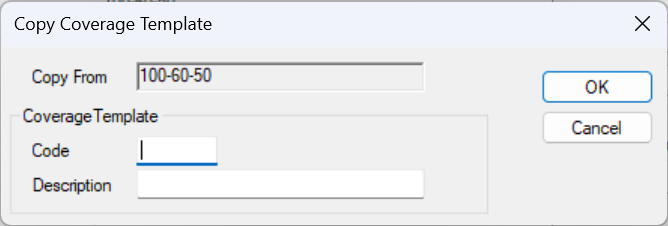
 ) button to move to the Selected Procedures list box.
 ) button to move to the Procedures (searched for) list box.