| Code
|
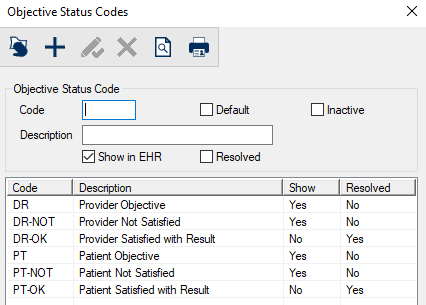
A text field that indicates the code that identifies the objective status.
|
| Default
|
A checkbox that, when selected, indicates this is the default status used when entering objectives.
|
| Inactive
|
A checkbox that, when selected, indicates the code is inactive and not in use.
|
| Description
|
A text field that describes the objective status. |
| Show in EHR
|
A checkbox that, when selected, indicates that objectives with this status are displayed in the EHR > Objectives tab of the odontogram. When deselected, objectives with this status are not displayed.
Note: Regardless of this checkbox, objectives will display in the Treatment Planning module.
|
| Resolved
|
A checkbox that, when selected, indicates that objectives with this status are considered resolved and are no longer displayed. |
 Objective Status Codes - Field Definitions
 ) icon.
  ) icon.
  ) icon.
  ) icon.
  ) icon.
  ) icon.