| Purpose:
|
A utility used to perform dispensary counts, used to monitor the stock that is physically present at each dispensary location.
|
| Related Module(s):
|
Dispensary
|
| Accessed From:
|
Maintenance > Dispensary > Dispensary Count Processes
|
| Window(s):
|
Dispensary Count Processes
|
| Dependencies:
|
Dispensary module must be configured.
|
Dispensary Count Processes Window
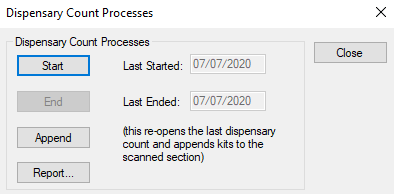
A dispensary count process is used to monitor the stock that is physically present at each dispensary location. The count process is started and ended from Maintenance. While a count is in progress, users cannot work with items and most buttons are disabled. The Check In button is replaced with a Count button, allowing you to perform the count.
Once a count has ended, you can print reports for each dispensary location.
Important: We recommend that you schedule and preform dispensary counts at least once every six months, approximately once a semester when the module is not in use.
When you have started a count, you must scan/enter the bar codes for all stock present at a location. You can do this from one mobile workstation or from multiple workstations, one for each dispensary location at your institution.
For more information on dispensary counts, refer to the axiUm Help File or the Dispensary User Guide.
The Dispensary Count Processes window allows you to start/stop the count process, append items after a count, and run reports.
 Dispensary Count Processes - Tasks Dispensary Count Processes - Tasks
| Start the Count Process
|
- Click the Start button.
- When prompted to confirm that no stations are using the Dispensary module, click Yes to begin the count process.
- Close the Dispensary Count Process window.
- Open the Dispensary module and complete the count process.
|
| Stop the Count Process
|
- Click the End button.
- When prompted to confirm that count process has been completed, click Yes to end the count process.
- Close the Dispensary Count Process window.
|
| Append Items to Last Count
|
- Click the Append button to display the Dispensary Count window.
- Append the items as necessary and close the Dispensary Count window.
- Close the Dispensary Count Process window.
For more information on appending to dispensary counts, refer to the axiUm Help File or the Dispensary User Guide.
|
| Report...
|
- Click the Report... button to display the Dispensary Count Report window.
- Complete the fields as necessary and click either the Print or Preview buttons.
- Close the Dispensary Count Process window.
For more information on dispensary count reports, refer to axiUm Help or the Dispensary User Guide.
|
|