Diagnostic Categories
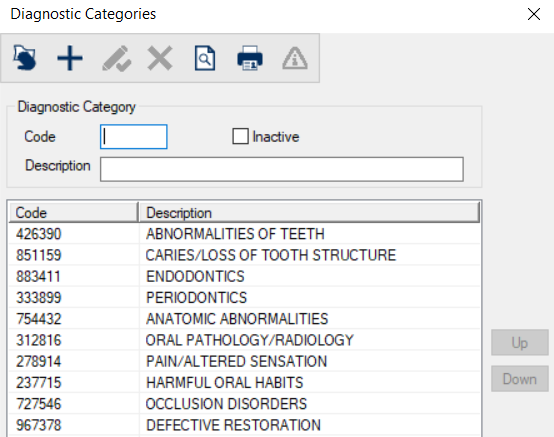
Diagnostic Categories WindowThe Diagnostic Categories window allows you to manage the lists of diagnostic categories and subcategories which are used to group sets of diagnosis codes in axiUm. Diagnostic categories and subcategories are used to group sets of diagnosis codes in axiUm.
 Diagnostic Categories - Field Definitions Diagnostic Categories - Field Definitions
Diagnostic Categories - Tasks
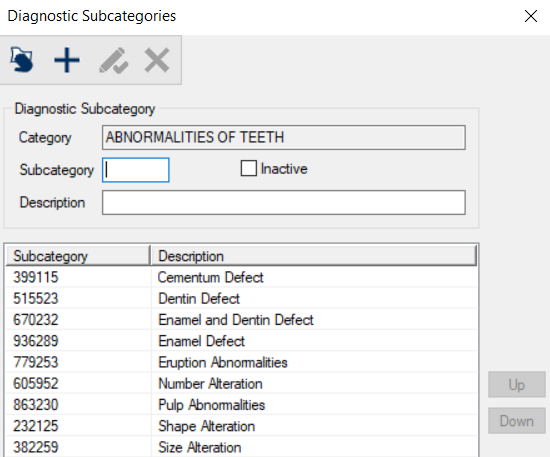
Diagnostic Subcategories Window(Maintenance > Clinical > Diagnostic Categories) The Diagnostic Subcategories window allows you to configure the list of diagnostic subcategories that are included within the selected diagnostic category. It displays when you open the Diagnostic Categories window, select a listed category and click the Subcategories (
Diagnostic Subcategories - Field Definitions
Diagnostic Subcategories - Tasks
|
 ) icon.
  ) icon.
  ) icon.
  ) icon to display the
  ) icon.
  ) icon.
  ) icon.