eRx Overview
|
eRx is an optional axiUm+ module that integrates with axiUm to offer e-prescribing software. Accessed through the EHR module, it enables providers to perform drug interaction checks, access over 65,000 drugs on a national drug database, review which drugs are covered under insurance, and submit prescriptions electronically to the pharmacy of their choice. This streamlines the prescription process by combining the searching and writing prescriptions into a simpler, automated process, eliminates paper prescriptions, and minimizes human error. eRx allows providers to update patient medications, problems and allergies in real time so that they do not need to be re-entered in axiUm. eRx also features built-in drug-to-drug and drug-to-allergy checking, formulary compliance, dose checking, and medication history, ensuring providers stay up to date with current information and provide better patient care. Note: The eRx module is only available in the US. From the axiUm eRx window, you can complete a variety of tasks related to your patient. This includes managing allergies, pharmacies, medications/prescriptions, problems, and related alerts and diagnoses. Each time you see a patient, you should review their record with them. This includes, but is not limited to, their demographic information, active medication list, allergy list, and problem list. Reviewing the record with the patient allows you to confirm you have the correct patient selected in eRx and ensure their record is still accurate. Important: Any patient that will receive a prescription through eRx must have their first and last names, date of birth, gender, and contact information, including address, zip code, and primary phone number recorded in their Patient Card in axiUm. For more information on working with eRx, see the eRx documentation.  Access Access
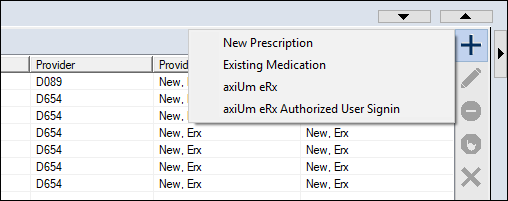
The eRx module is accessed through the EHR module. Note: If accessing eRx for the first time, you are prompted to accept the terms of use.
Tip : You can also click the drop-down arrow (
The axiUm eRx window displays with the selected patient’s information. Note: If accessing eRx for the first time or with a new patient, no allergy or pharmacy information displays, and you are prompted to enter them.
|
 ) icon > Medications tab.
 ) and select the Medications sub-tab.
 ) icon and select axiUm eRx or axiUm eRx Authorized User Signin.