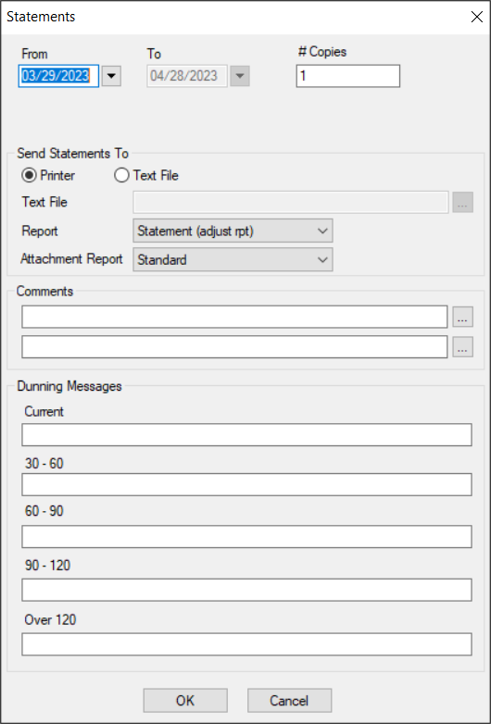
| From/To |
The date range defaults to the last 32 days.
If necessary, you can select a custom starting date from the calendar drop-down.
|
| # of Copies |
The number of copies defaults to 1.
If necessary, modify the value to indicate the number of copies required.
|
| Statement For
|
Select a guarantor on this patient’s record from the drop-down.
Note: This field only displays if the patient has a primary guarantor other than themselves or a secondary guarantor who is responsible for a payment plan.
|
| Printer / Text File |
Select a radio button to indicate if you want to print the statement or create a text file.
|
|
Text File |
If enabled, click the ellipsis to set a name and path for the file.
Note: This field is only enabled if the Text File radio button is selected.
|
| Report |
Note: If your institution has only one Statement report, this field does not display.
Select the statement report that will print or be created from the drop-down.
|
| Attachment Report |
Note: This field only displays if your institution has multiple Statement reports and the Maintenance > System > System Options > Electronic Attachments window > Statements checkbox is selected.
Select the statement report that will be attached as a patient attachment from the drop-down.
|
| Comments |
Next to each field, enter a comment manually or click the ellipsis to select a code from the Comment Codes window.
|
| Current / 30-60 / 60-90 / 90-120 / Over 120 |
Next to each field, enter the message that will display on the Statement report for the collection of accounts receivable currently outstanding, 30-60 days outstanding, 60-90 days outstanding, 90-120 days outstanding, and over 120 days outstanding.
|