|
Like the paper version, sticky notes are used to store and display small pieces of information and can serve as reminders for you or other users.
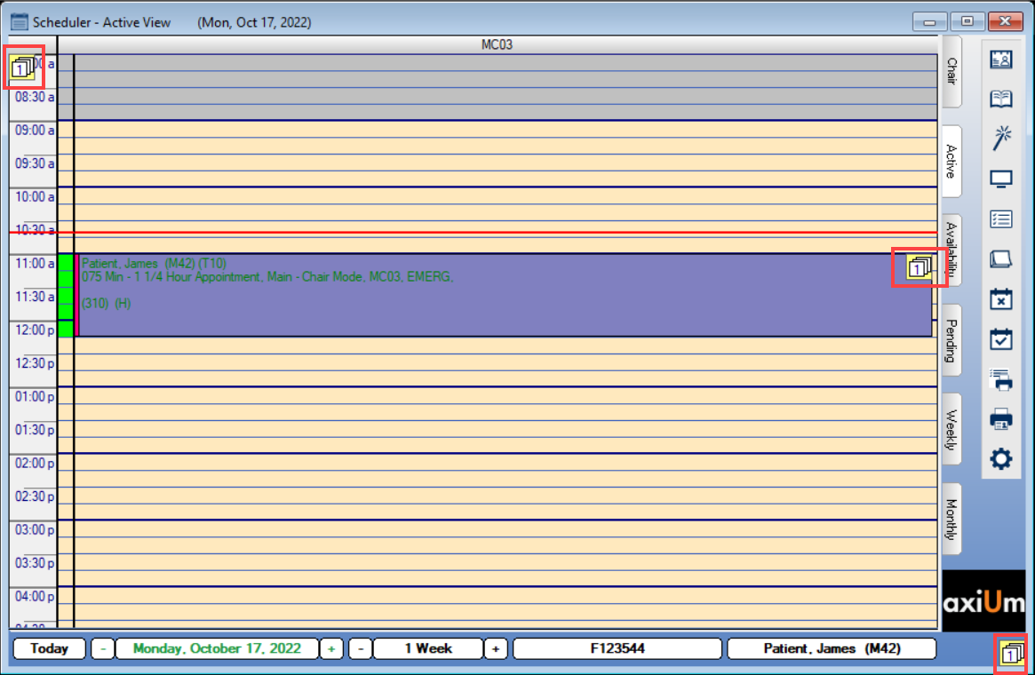
They can be added via the Note/Stickies ( ) icon and attached to different areas in the Scheduler. They may be dragged and attached to a book/clinic (top left), an appointment (middle), or as a general scheduler note that displays for all users (bottom right). ) icon and attached to different areas in the Scheduler. They may be dragged and attached to a book/clinic (top left), an appointment (middle), or as a general scheduler note that displays for all users (bottom right).
Notes:
-
When working in Book mode, sticky notes can be attached to the selected clinic when in the Chair tab, but can be attached to the selected book when in the Active tab.
-
When working in Chair mode, sticky notes can be attached to the selected clinic, regardless of whether you are in the Chair or Active tab.
Sticky notes display as small, numbered icons that indicate the number of notes waiting.
|