Print the Appointment List Report

When necessary, you can generate and print the Appointment List report from the Scheduler.

Note: The Appointment List report uses the appoint.rpt file in your SReports folder.

To print the appointment list:

  1. Open the Scheduler module and click the Print List () icon to display the Print Appointment List window.
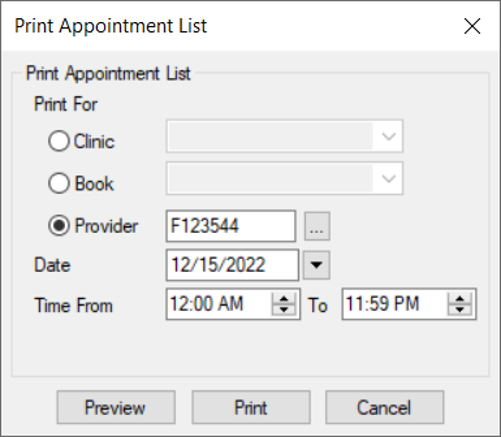
  2. Complete the fields as necessary.

  3. Field Description
    Print For

    Select a radio button to indicate whether you want to run the report based on clinics, books, or providers:

    • Clinic: If selected, select a clinic or All Clinics from the enabled drop-down list.

    • Book: If selected, select a book or All from the enabled drop-down list.

    • Provider: If selected, click the ellipsis to display the Providers List window and select a provider.

    Date

    The date defaults to today’s date.

    If necessary, you can select another date from the calendar drop-down.

    Time From / To

    Click the arrow buttons to set the start and end times for the report.

  4. (Optional) Click Preview.

  5. Click Print.