Clinic Time Exceptions
|
You can also use the icons in the toolbar to complete tasks unrelated to any sub-tab. This includes managing Clinic Time Exceptions for the selected user. Clinic Time Exceptions are used to indicate that a provider is not available to work in their regularly scheduled clinic and chair(s). Examples: Vacations, exams, or when in a clinic that does not use axiUm. Alternatively, a provider or instructor may be unavailable in their regularly scheduled clinic, but available to work in a different clinic. Example: A student works a Perio rotation and takes time from their regular clinic to work in a Perio clinic. Once set, they can prevent appointments from being booked for a specific provider when they are not in the clinic. You can set and manage any necessary clinic time exceptions. To manage clinic time exceptions:
 Add Clinic Time Exceptions Add Clinic Time Exceptions
Search for Additional Clinic Time Exceptions
Edit Provider Clinic Time Exceptions
Delete Provider Clinic Time Exceptions
View Provider Clinic Time Exception History
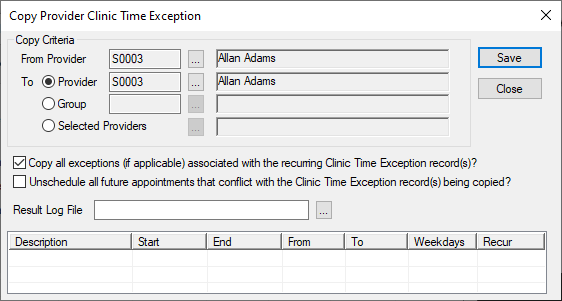
Copy Clinic Time Exceptions From / To
You can copy clinic time exceptions. This can save you time when creating additional provider clinic time exceptions.
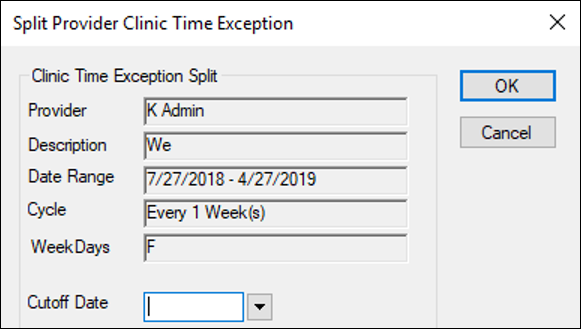
Split Clinic Time Exceptions
You can split a time exception record, creating two separate records that have the same details, but different start and end dates. This is necessary when changes need to be made to a recurring exception that has dates in the past. Once the record has been split: To split a clinic time exception:
Note: This will be the end date of the first record and the start date of the second record.
|
 ) icon to display the Provider Clinic Time Exception window.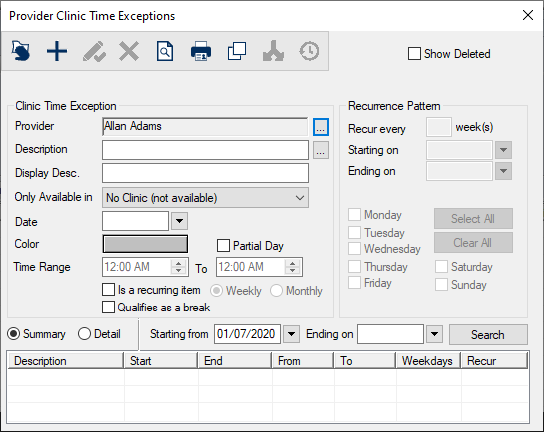
 ) icon.
 ) icon.
 ) icon.
 ) icon.
 ) icon to display the Provider Clinic Time Exception History window.
 ) icon to display the Copy Provider Clinic Time Exception window.
 ) icon to display the Split Clinic Time Exceptions window.