Specify Benefit Plans
|
Important: Given the complex nature of benefit plans, we do not recommend adding benefit plans from the Patient Info window > Insurance tab. We recommend that your institution disable all fields in the Insurance tab except for the Link to Insurance Benefit Plan ( The Insurance tab contains fields related to the patient’s insurance plans(s). This includes the benefit plan information such as the insurance provider, employer, coverage details, patient payment details, and policy information, such as subscriber details and family balance. A benefit plan provides coverage for a variety of medical and dental procedures. Insurance companies provide coverage to patients through benefit plans that are private (purchased by the individual), provided by an employer or provided through government programs. Note: Many people obtain coverage through another person’s insurance coverage (spouses, children, etc.) Depending on the type of plan, the coverage may be for full or partial, and the patient may be responsible to pay deductibles, and/or any amounts not covered by their insurance. Some plans contain multiple people with the same coverage. The benefit plan has the same insurance company, group number (the benefit plan ID) and coverage, but each person on the plan has a different subscriber number. In the cases of employer-provided plans, many companies provide insurance benefit plans that covers some or all of their employees’ dental procedures and expenses. Some companies have multiple benefit plans that provide varying levels of coverage linked to them. This is more common for companies in multiple states/provinces because insurance providers often vary by region. When an employee with a company benefit plan becomes a patient, and has their employer added to their record, you can add the employer’s insurance to the patient. Tips:
To specify a benefit plan:
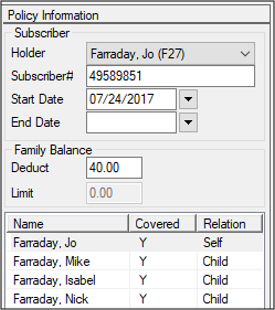
 Policy Information fields Policy Information fields
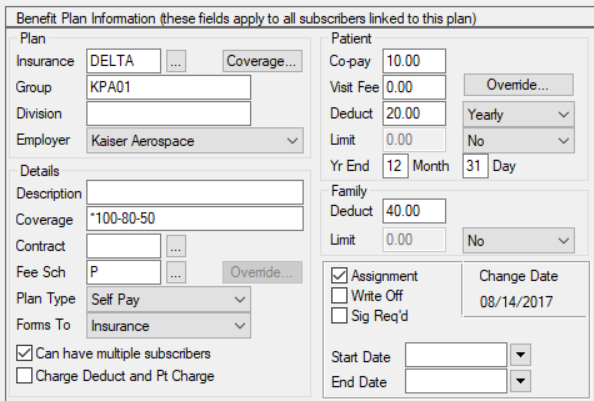
Warning: Information added under the Benefit Plan Information section affects all policy subscribers on the plan; information added under the Policy Information section affects only the individual subscriber. Benefit Plan Information fields
Policy Information fields
|
 ) icon so that only users with insurance permissions can create benefit plans. Even then, we recommend you add plans via the Maintenance module to prevent benefit plan duplicates.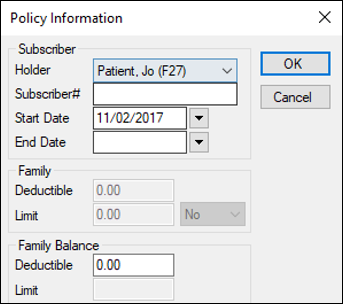
 ) icon.