Manage Patient Needs
|
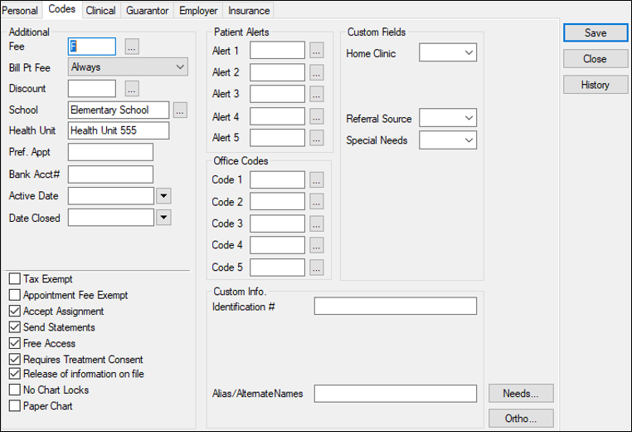
A patient need is an identified dental issue or requirement that must be addressed by your institution. Some patients may have multiple needs. Patient needs aren’t specific to ADA codes and have no associated dollar value. Example: A patient arrives at the institution and requires a crown. Most institutions enter patient needs during the screening period. Once identified, axiUm uses the needs to match patients to providers who must fulfill specific treatment procedures to meet their graduation requirements. Patient needs can be managed in the Patients module and the Patient Info window > Codes tab. To manage patient needs:
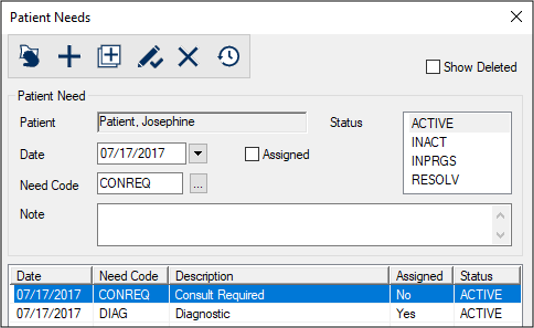
Tip: You can also open the Patients window > right-click the patient > select Patient Needs to display the Patient Needs window.
 Add One Patient Need Add One Patient Need
Add Multiple Needs
View Needs
View Deleted Needs
The deleted patient need displays in the lower list in gray. Edit Needs
Delete Needs
|
 ) icon.
 ) icon.
 ) icon to display the Add Patient Needs window.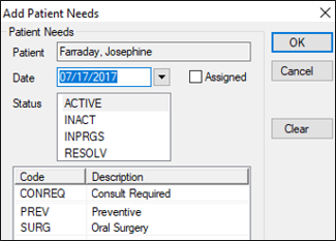
 ) icon to save your changes.
 ) icon.