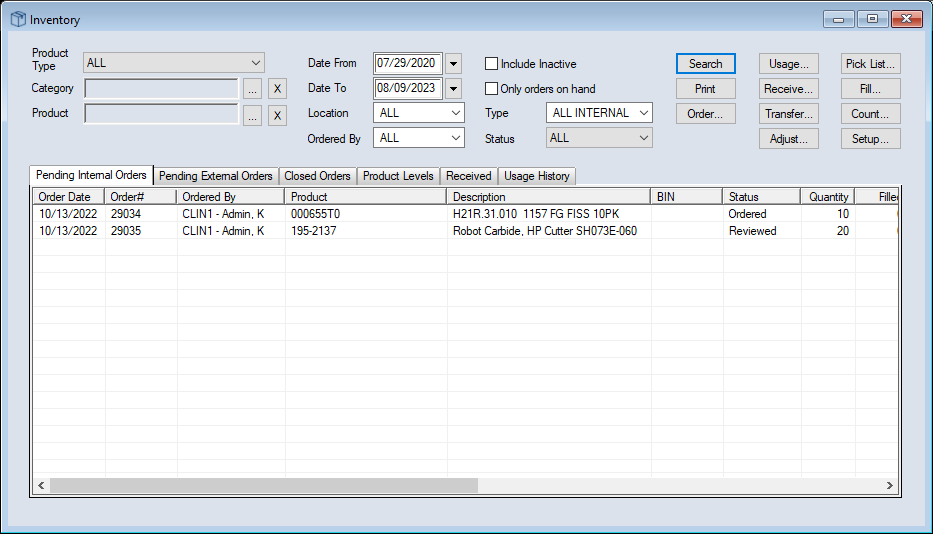
|
Category
|
Click the ellipsis to select an entry from the Product Categories window.
Note: The Product Categories window displays all categories that fall under the specified Product Type. If no Product Type is entered, all categories will display.
|
|
Product
|
Click the ellipsis to select a Product Code from the Inventory Products List window.
|
|
Vendor
|
Click the ellipsis to select the vendor who supplied the product from the Vendors List window.
|
|
Date From /
Date To
|
Select your search’s start and end dates from the calendar.
|
|
Location
|
Select which Inventory location the items originated from.
|
|
Ordered By
|
Select the inventory location that made the order.
|
|
Include Inactive
|
Select the checkbox to include discontinued products.
|
|
Only orders on hand
|
Select the checkbox to limit your search to orders which include items in stock.
|
|
Type
|
Select the order type you want to search for.
Note: The entries available vary depending which tab is open.
|
|
Status
|
Select the order status you want to search for.
Note: The entries available vary depending which tab is open.
|
|
Exclude items with zero balance
|
Select the checkbox to exclude products with a 0 balance.
Note: Products with an undetermined or null value are still included.
|
|
Include Order quantities (to re-order)
|
Select the checkbox to include additional order detail columns in your search results.
Note: If selected, it enables the Show re-order items only checkbox and disables the Per Location checkbox.
|
|
Show re-order items only
|
Select the checkbox to search for products that are on re-order.
Note: This checkbox is enabled if you select the Include Order quantities (to re-order) checkbox.
|
|
Per Location
|
Select the checkbox to sort your search results by location.
Note: This checkbox is enabled if the Include Order quantities (to re-order) checkbox is deselected.
|