Inventory Reports
|
You can run a variety of custom reports to help monitor daily and weekly Inventory activity.  Run Product Overviews Run Product Overviews
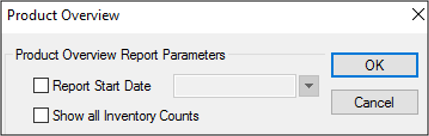
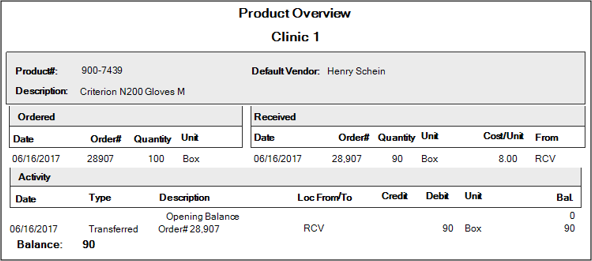
A Product Overview is a report which shows all Ordered, Received, and Activity information related to one product within one Inventory location. Note: The report will list other locations if an item activity relates to another location. Example: If an item is transferred between locations, the Loc From/To column will list a location in the report. To run a Product Overview:
The calendar date field defaults to one month prior. The Product Overview report opens in Crystal Reports.
Manage Inventory Reports in Info Manager
There are several reports in the Info Manager module > Clinical Mgt tab that pull information from the Inventory module. You use these reports the same as other Info Manager reports. You can customize, create, filter, save, and print or export them.
Note: Several Inv. Act. Type column values reflect activity information from the Dispensary/Inventory integration. Usage refers to the products that are removed from the Inventory module, while Check-out and Check-in refer to the items that are removed from / returned to the Dispensary module. |