|
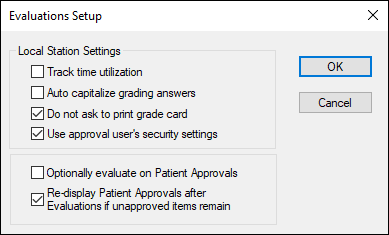
Track time utilization
|
Select the checkbox to display the Period field on the Add/Edit Evaluations window and allow evaluators to indicate whether the evaluation is for a morning, afternoon, or evening session.
|
|
Auto capitalize grading answers
|
Select the checkbox to display all grading answers entered on an evaluation form in upper case.
|
|
Do not ask to print grade card
|
Select the checkbox to prevent axiUm from displaying the Print Grade Question window when you complete an evaluation.
|
|
Use approval user’s security settings
|
Select the checkbox to display the approval user’s name next to each answer when completing evaluations.
Note: If deselected, the logged in user’s name displays next to each answer when completing evaluations.
|
|
Optionally evaluate on Patient Approvals
|
Select the checkbox to display the Enter Evaluation checkbox on the Patient Approvals window.
|
|
Re-display Patient Approvals if unapproved items remain
|
Select the checkbox to re-display the Patient Approvals window if some items still require approval after a user approves a treatment.
|