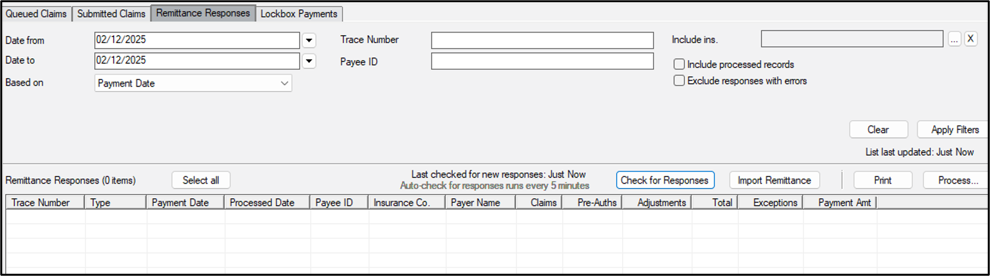
| Date from / Date to
|
Enter a date range from the calendar to filter results based on date.
|
| Based on
|
When searching by date, select the appropriate date to use:
- Payment Date: This is the date the payment was made as indicated on the remittance file.
- Process Date: This is the date the payment was auto-processed.
Tip: If you select Process Date, all payments processed on the same date can print on the same report.
|
| Trace Number
|
Enter the remittance record’s unique reference number to search for a file.
Note: The trace number is used to reference payment similar to an electronic check number.
|
| Payee ID
|
Enter the payee ID to filter based on Payee.
Note: Payee IDs can be a practice’s NPI or Tax ID, or an individual’s NPI or Tax ID.
|
| Include ins. |
Click the ellipsis to select which insurance companies to include in the search.
|
| Include processed records
|
Select the checkbox if you want to include processed records in your search.
|
| Exclude responses with errors
|
Select the checkbox if you want to exclude records with errors from your search.
|
 Search Fields