Auto Remittance Overview
|
The Auto Remittance module is an optional axiUm+ module that is designed to work alongside the Claims module and complement the Claims workflow for electronic submission of insurance claims. The Auto Remittance module allows you to receive electronic remittance responses from insurers as Explanation of Benefits (EOB) files. You can easily import the remittance responses into axiUm and automatically allocate the insurance payments to the appropriate procedures. Note: Remittance responses are formatted as standard HIPAA-defined 5010 835 files. Each insurance remittance file contains information about the payee, the payer, the claims adjudicated, the EOB, the amount, and other identifying payment information. It may contain pre-authorization responses, claim reversals, and (claim-independent) provider-level adjustments. This automation significantly reduces manual data entry and enhances the accuracy of insurance payment processing. Important: The claims and remittance process is fully integrated with axiUm and the Claims Service is required to use the Auto Remittance module. Prior to 2025.1, the ITS Bridge application is still required to work with insurance claims. As part of insurance payment processing, the Auto Remittance module allows you to configure basic rules for handling balances, such as automatically writing off amounts not covered, and a report is provided after an insurance payment is processed to list claims that must be reviewed and manually updated. Your institution may choose to adjust remittances using a more advanced adjustment option called Intelli-adjustments. Intelli-adjustments allow you to configure rules that link specific insurance reason codes to appropriate adjustment codes and behavior. As insurance payments are processed by the Auto Remittance module, those that include the configured insurance reason codes have their claim balances auto-adjusted based on the rules configured. Additionally, defaults and overrides are available to allow for different behaviors between insurance companies. This reduces staff time spent manually adjusting remittances. Important: Intelli-adjustments do not change the use of the Auto Remittance module, in that there are no steps for you to take. The difference to you is that less manual intervention is required.
 Access Access
The Auto Remittance module is accessed through the Claims module > Remittance Responses tab. You can open the Auto Remittance module using one of the following methods:
Organization
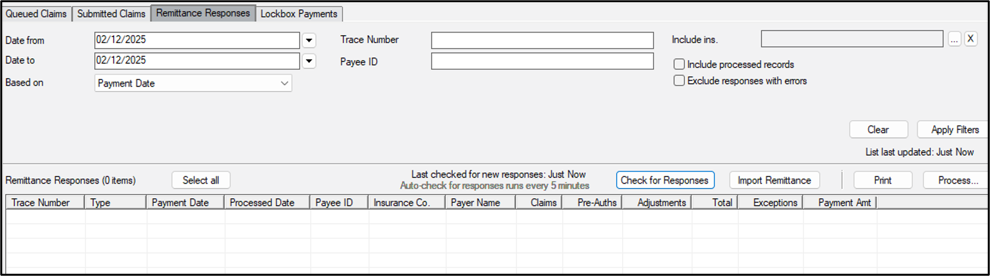
The Auto Remittance module is made up of an upper pane and a lower pane, all housed within the Remittance Responses tab. The upper pane contains a variety of search criteria fields and activity buttons.
Reports
You can run a custom report from the Info Manager module > Billing tab to help monitor Auto Remittance activity. You use this report the same as other Info Manager reports. You can customize, create, filter, save, and print or export it.
|
 ) icon, then click the Remittance Responses tab.